



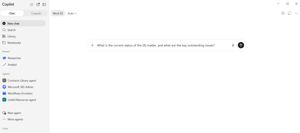
Try this now, before you read any further.
Open Copilot and ask it something like: "What is the current status of the [X] matter, and what are the top outstanding issues?"
Use a real matter. Something live, that you'd struggle to summarise from memory.
Then read what comes back, and rather than judging the answer, work out what it was built from.
Two versions of the same answer
The common version. Copilot can see your Outlook mailbox, so it has your side of the correspondence. It can see documents in your OneDrive and whatever has made it into SharePoint. It cannot see documents on the shared drive. It cannot see your colleagues' mailboxes - the advice your teammate gave the business last month, the email from external counsel that went to someone else, the thread where the commercial team agreed something that changes the whole matter. Depending on how your SharePoint tenancy is structured (or not), it could search more widely across the tenant, reviewing a lot more documents, looking for what might be relevant.
So you get a summary that is confident, fluent, and built from perhaps 40% of the actual record, which is arguably worse than nothing, because the gaps aren't visible in the output. The answer doesn't say "there is material I can't see and I've drawn on stuff I shouldn't have." It just reads as though it's complete and accurate.
The other version. Every document and every email relating to the matter - from you and from everyone else on the team - is filed to a matter site in SharePoint. Copilot can see the full record, and only the record: the material relevant to this matter, without the noise of everything else in the tenant.
Now the summary is genuinely useful. Not because Copilot is better, but because it can see.
Response time and token cost considerations
Token cost consideration is now at the forefront of every AI discussion, with this in mind ponder these three questions...
- Which method should produce a quicker answer?
- Which method should consume less tokens?
- Which method should produce a better answer?
This isn't hypothetical
I had this experience myself not long ago. I was coming to the end of a piece of client work, and about to write it up, and rather than going back through everything, I typed a simple question into Copilot: what's the latest status?
What came back was an immediate and accurate summary of where things stood - the correspondence, the open questions, what had been agreed along the way.
The reason it worked wasn't the prompt, and it wasn't anything clever I'd set up. It was that all my emails and documents for that piece of work were in SharePoint. Nothing on a local drive, nothing sitting only in my mailbox. Copilot could see the whole record, so it could summarise the whole record.
That was the point at which this stopped being a theoretical argument for me. The value I got had almost nothing to do with the Copilot licence and almost everything to do with where my information happened to live.
What this means for AI strategy
A version of the AI conversation in many legal teams goes: which tool should we buy, what can it do, and how do we get people using it?
The Copilot test suggests a different first question. What can any AI tool actually see?
Because the answer, in most in-house teams, is: your own mailbox, some of OneDrive, and whatever happens to have been filed properly. Everything else - the shared drive, the mailboxes of the rest of the team, the documents attached to Teams chats, the folder on someone's desktop - is invisible.
You can buy the best legal AI product on the market, and it will still be reading a fraction of your record.
This is why I'd argue information architecture is now the AI decision, not a precursor to it. Every dollar spent getting your matters properly structured increases the return on every AI tool you subsequently license, including the ones that don't exist yet.
The matter file
What "properly structured" means in practice is a matter file that actually holds everything:
- Every document and every email, by matter. Not by person. The test is whether a colleague picking up your matter tomorrow would find the full history in one place.
- Versions and metadata, so the current draft is identifiable and documents can be found by attribute rather than by remembering the filename.
- Permissions and privilege, set per matter, so sensitive matters are restricted without restricting everything.
- Retention and an audit trail, applied automatically rather than depending on someone remembering the policy.
- Safe sharing with other stakeholders, so the business gets access to what it needs without documents being emailed out of the system.
The filing problem, and how to solve it
The obvious objection: none of this works if people don't file, and lawyers are not famously diligent filers.
That objection is correct, and it's why this fails when it's approached as a policy. Telling people to save emails and meeting notes to SharePoint doesn't work if saving to SharePoint is slower than not doing it.
The answer is to make filing easier than not filing. That's largely a tooling question. A tool like Ideagen OnePlace Solutions lets people file an email or an attachment to the matter, with the metadata attached, from inside Outlook or Word - where they already are - without switching applications. Power Automate creates the matter site and folder structure when the matter is registered, so there's always an obvious place for things to go.
Get that right and filing stops being a compliance exercise. Your team will realise the difference in outcomes between when they all file and when they don't.
Going further with a Power App
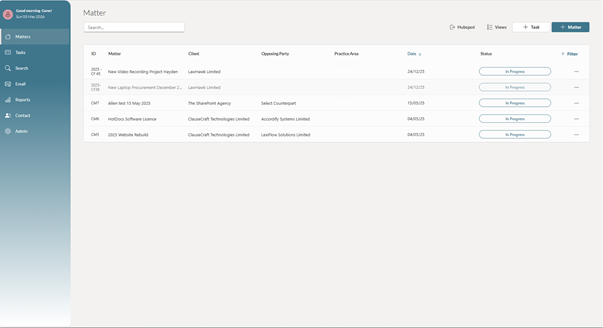
The matter file covers documents and emails. A lot of what you'd want in a real status summary isn't a document at all: the stage the matter is at, who owns it, what tasks are outstanding and when they're due, cost to date against estimate, which external counsel are engaged.
That data sits in SharePoint lists behind the Power App. And it can be made available to AI too – Copilot can be pointed at those lists as well as the document library, so the summary covers the tasks and the deadlines and the financials alongside the correspondence.
At that point you're asking a question about a matter and getting an answer drawn from the complete picture.
Run the test
I'd encourage you actually to try it rather than take my word for it. Ask Copilot about a live matter and look carefully at what it knew and what it missed.
Whatever comes back is a fair description of your position. If it's thin, that's not a reason to conclude AI is overhyped. It's a reason to look at where your information lives.
Now try the same test by placing your matter content and emails into a single SharePoint document library and run your prompt again from the document library.
- Which method produced the quicker answer?
- Which method consumed less tokens?
- Which method produced the better answer?
If you'd like to talk through what this could look like for your team, I'm always happy to have a conversation.
This post is part of a series on building an in-house legal operating system on the Microsoft 365 you already have. You can see the other posts here:
You probably don't need a whole new legal operations platform
One front door: legal intake and the matter register
Why Your Unique Work Rules are More Important than the AI Tool
LawHawk works with The SharePoint Agency to deliver Microsoft 365 foundations for legal teams.
