



Here's a test you can run in the next thirty seconds.
Open Microsoft Copilot and ask it for the current status and top outstanding issues on a matter you're working on right now.
Then look carefully at what comes back - not at whether the summary reads well, but at what it's built from and how complete it is, because the quality of that answer isn't really a verdict on Copilot. It's a verdict on where your information lives.
I'll come back to that in a later post in this series. For now, hold onto whatever you got, because it's the most honest assessment of your team's information architecture that you can obtain for free.
The usual response to this problem
When an in-house legal team decides its information is a mess, the standard next step is to go looking for a legal operations platform. Matter management, document management, intake, reporting, all in one product.
Some of those products are good. But before you start that process, it's worth understanding what you're actually buying, because it's mostly not technology. It's an arrangement.
What a legal operations platform sells you is a place for matters to live, a front door for requests, a way to see what's happening across the team, a place for documents and emails to live, and rules about who can see what.
Your organisation almost certainly already owns most of those components. What it doesn't have is them arranged.
The arrangement is what you should invest in. It costs far less than a whole new platform, and it's a known pattern rather than something anyone needs to design from scratch.
What you already own
If your organisation runs Microsoft 365 - and in New Zealand, most do - you already have:
-
SharePoint, which can be a genuine single source of truth for documents and emails, organised by matter, with versions, metadata, permissions and retention.
-
Outlook and Word, where the work actually happens and where advice is written and received.
-
Teams, for collaboration, calls, transcripts and actions.
-
Power Apps and Power Automate, to create a matter register, spin up a matter site automatically when a request comes in, and give the team one view across everything.
-
Copilot and the ability to build your own agents in Copilot Studio.
-
Entra, Purview, DLP and retention - enterprise-grade governance your IT team already administers and already understands.
You're paying for all of it. In most legal teams, they use only a fraction of it.
Two things worth adding
I don't want to overstate the "you already own everything" line, because it isn't quite true.
Microsoft 365 gets you a long way, and it's the right foundation. But there are two points where what comes out of the box makes the work harder than it needs to be, and where a small amount of additional spend adds a disproportionate amount of value. We recommend both to almost every team we work with.
-
Cognito Forms, for intake. Microsoft Forms will capture a request, and if it's the difference between having intake and not having intake, use it. But legal intake outgrows it quickly. You want branching, so a procurement request asks different questions from an employment one. You want calculations. And you want the form to feed document automation directly, so a straightforward request can produce its own first draft rather than joining a queue. Cognito Forms does all three, and it costs very little.
-
Ideagen OnePlace Solutions, for email and document management. This is the one that decides whether the whole thing works. A matter file only holds the full record if people actually file to it, and they won't if filing is more annoying than the benefit is obvious. OnePlace lets someone save an email or an attachment to the right matter, with the metadata attached, from inside Outlook or Word - without switching applications or thinking about folder structures. It will also auto-file, so further correspondence on a matter lands in the matter file without anyone doing anything more. And if one person files an email, everyone else on the team can see it's been done, so there's no duplication of effort.
Neither is expensive. Both integrate cleanly with everything else in the diagram, and between them they address the two places where these projects most often fail - intake people work around, and filing people don't do.
So my recommendation isn't that you need nothing new. It's that you need two modest additions to a platform you're already paying for, rather than an entirely new system that duplicates capabilities you already have.
The arrangement creates the value.
I've put together a diagram of what this looks like when it's assembled properly.
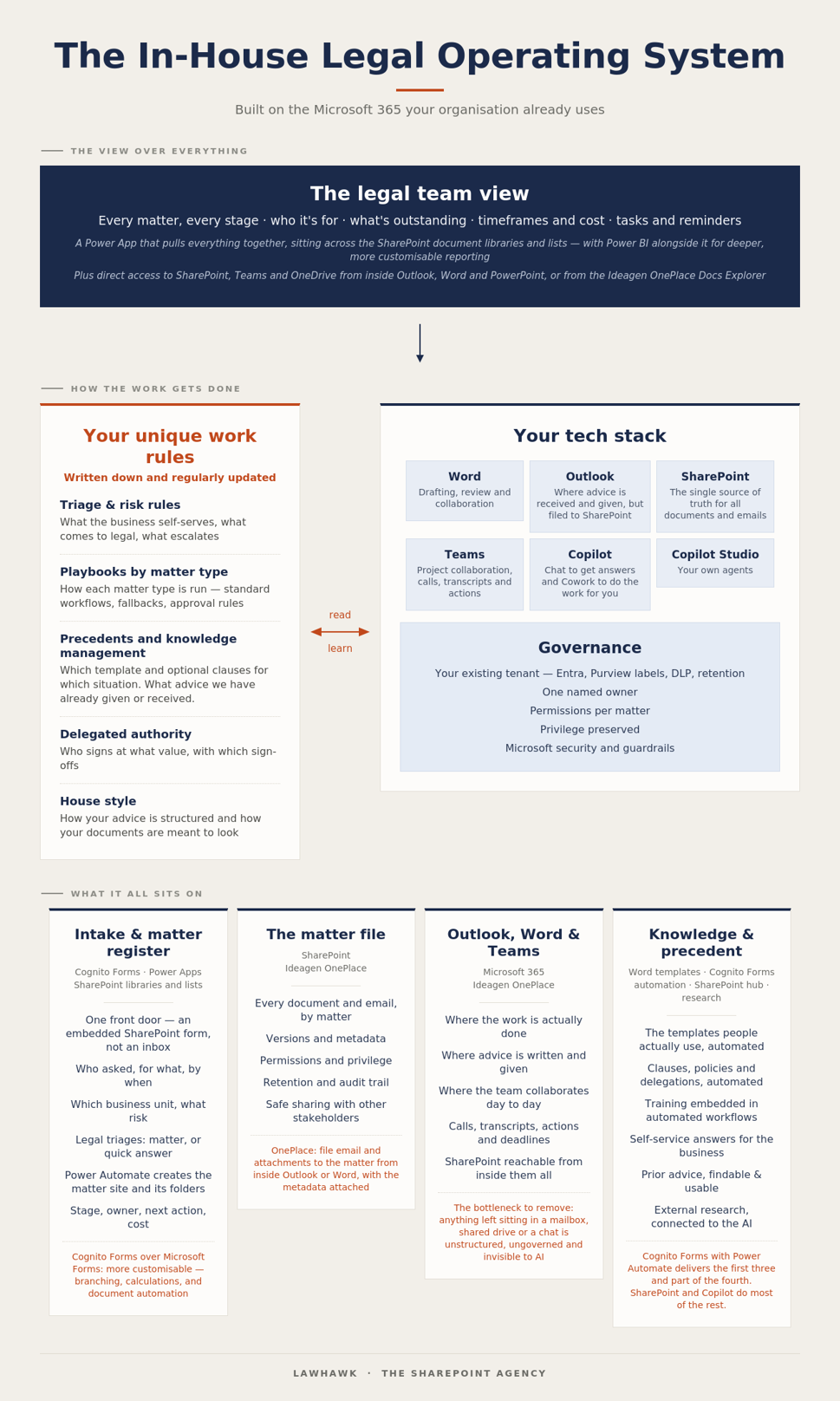
Three things are worth pointing out.
-
The top layer is the view. A Power App sitting across the SharePoint libraries and lists, giving the team one place to see every matter, every stage, who it's for, what's outstanding, timeframes and cost, tasks and reminders. That view is what people usually think they're buying when they buy a platform.
-
The bottom layer is where everything actually sits. Intake and the matter register. The matter file. Outlook, Word and Teams, where the work gets done. Knowledge and precedent. Each of these is a normal Microsoft 365 capability, configured deliberately rather than left to individual habit.
-
The middle-left box is the one that isn't technology at all. Your triage and risk rules. Your playbooks by matter type. Your precedents and knowledge management. Your delegated authority. Your house style. No platform will generate these for you, and nobody can sell them to you off the shelf, because the substance has to come from your team. But that doesn't mean you have to write them alone - and in my experience, teams that try tend to produce something considerably thinner than what's actually in their heads. Most of this knowledge is tacit. Getting it out takes someone who knows what to ask, has seen how other teams have answered the same questions, and knows what the technology can do with the answers. That's a large part of what we do after a discovery, and it's the difference between a set of rules that documents current practice and a set that improves it.
Why this route is usually better
-
You're not adding a new place to work. Every new platform is another place to look, another login, another integration, another renewal. The two tools above are the exception that proves the point, because neither is somewhere people go. OnePlace sits inside Outlook and Word, and no data leaves your tenancy. Cognito Forms sits in front of the process, embedded in SharePoint, and holds submissions only as long as you want it to - you set how long that is. If data residency rules that out for your organisation, Microsoft Forms or a Power App will do the job with less capability. Either way, everything ends up in SharePoint, and the work stays where people already are.
-
Governance is solved. Privilege, permissions per matter, retention, data classification - your organisation's existing tenant already does this, and your security team already trusts it. That is a genuinely large advantage, and it removes a procurement conversation that can take months.
-
It isn't bespoke. This is worth being clear about, because "build it on Microsoft 365" can sound like a consulting project with an open-ended scope. It isn't. The arrangement in the diagram is a pattern LawHawk and The SharePoint Agency deploy similarly each time. We have a flexible foundation that can be customised but remains stable, scalable and easy to support. What differs between organisations is the configuration and the work rules, not the overall design. You're not paying anyone to invent an approach for you, and you're not the first team to find out whether it holds up.
-
It's ready for what comes next. This is the point I'd emphasise most, because it's what's been missing. The value of AI to your team is almost entirely determined by what it can see and how well organised that is. A team whose matters are properly structured in SharePoint is in a fundamentally different position from one whose information is spread across mailboxes and shared drives - regardless of which AI tools either of them has licensed.
How it actually goes in
This isn't a project you should do in stages, but it can be done quickly all the same.
Piecemeal makes it harder, not easier. A front door with nowhere structured to put the matter, or a matter file nobody files to because the intake still arrives by email, gives you a fraction of the benefit and a fair amount of the disruption - which is how these initiatives lose support.
The components go in together, and they go in quickly.
You start with a new SharePoint environment. The SharePoint Agency can install their Power Apps into it straight away. At the same time, or even earlier, you licence OnePlace and set it up. That gives you visibility over how your SharePoint tenancy is actually structured. I can adapt our Cognito Forms intake to match how your team likes to work - usually less than a day - and we use Power Automate to connect it to the SharePoint lists the Power Apps draw on.
At that point, everything is in place in a clean environment with no real data. We test it together and make sure it all works end to end. Your team creates dummy matters to confirm it does what they need, and we make any further adjustments.
Then you start using it for new matters, while your existing matters stay exactly where they are. Nothing has been moved, so there's no risk of losing anything, and no migration standing between you and the benefit.
Once you're happy it's working, you decide whether to migrate some or all of your existing matters across. That's a separate decision, based on evidence rather than a leap of faith at the start.
Compare that with a platform implementation, where migration is usually a precondition rather than an option, and the first time anyone sees whether the thing suits them is well after the money is committed.
Why this might work when previous attempts didn't
If you've tried to improve matter management before and it didn't stick, you're in the majority.
We've seen many teams attempt it and run into the same wall, which eventually kills the project: nobody will change how they work - particularly where they file documents and emails - unless they can see the benefit to themselves.
Previously, a team would agree to file emails in SharePoint, and then hardly anyone actually would. And honestly, what was the point? Collaboration, covering for sickness or leave, business continuity - all real arguments, and none of them ever strong enough to change daily habits.
What's different now is Copilot. Once a team sees what it can do when everyone is on board, the benefit stops being an abstraction. It becomes a tangible picture of what the team gains by changing, and what it loses if only some people do.
That's the first genuinely compelling answer to "why should I file this properly?" that I've seen in this area, and it's the reason I think these projects will land now in a way they haven't before.
Where to start
Not with a platform evaluation. Start with two questions:
What does a request to legal look like today, from the moment someone decides they need us to the moment they get an answer? And where does everything we produce along the way end up?
Answer those honestly, and the gaps in the diagram will be obvious. In most teams, the two biggest ones are the front door and the filing - which is exactly why the two tools above earn their place. In the following posts, I'll work through the layers: intake and the matter register; the matter file and what it means for AI; and the work rules that make it work just as you want.
If you'd like to talk through what this would look like for your team, I'm always happy to discuss it.
This post is part of a series on building an in-house legal operating system on the Microsoft 365 you already have. You can see the other posts here:
One front door: legal intake and the matter register
Maximising AI Potential: The Importance of Information Architecture
Why Your Unique Work Rules are More Important than the AI Tool
LawHawk works with The SharePoint Agency to deliver Microsoft 365 foundations for legal teams.
