



The standard advice is to start with high-volume, low-complexity documents. Get a lot done quickly, learn how automation works, produce something that's clearly good enough for people to get value from.
There's a lot in that, particularly if you're just starting out. But it's a blunt instrument, and if you use it as your only filter you'll end up with a list that misses some of the biggest opportunities in your organisation.
Here's a more useful way to look at it.
Two axes, not one
Frequency of use. How often is this document drafted, and by how many people? This one is straightforward. Documents produced constantly, by lots of people, are where per-use savings compound and where your licensing works hardest.
Total drag removed. This is the axis most frameworks get wrong, because they use "complexity" instead - which really only measures how hard the template will be to build.
Drafting time is part of drag. There are documents where you can genuinely take ten hours out of a share sale agreement or a complicated facility agreement. But a lot of the drag around documents has nothing to do with drafting:
- Intake. How long does it take to gather the information you need - in one go, in the right format, without four rounds of clarifying emails?
- Re-keying. Once you have the information, does someone re-enter it? How much of that could disappear with an integration or AI that lets data flow straight into the intake tool?
- Approvals. Is the document being attached to an email and sent to several people one after another, so they can reply "approved" or paste in a signature?
- Signing. Once the document is generated, does someone still have to tag it up manually? Or does it go through an entirely manual signing process with all the friction that comes with it?
- Loss. After all that work, documents routinely end up on a shared drive, in someone's OneDrive, or attached to an email. Losing track of the signed document - the most valuable artefact in the whole process - is its own significant cost.
Score both axes and you get a much more honest picture than complexity alone gives you.
The quadrant
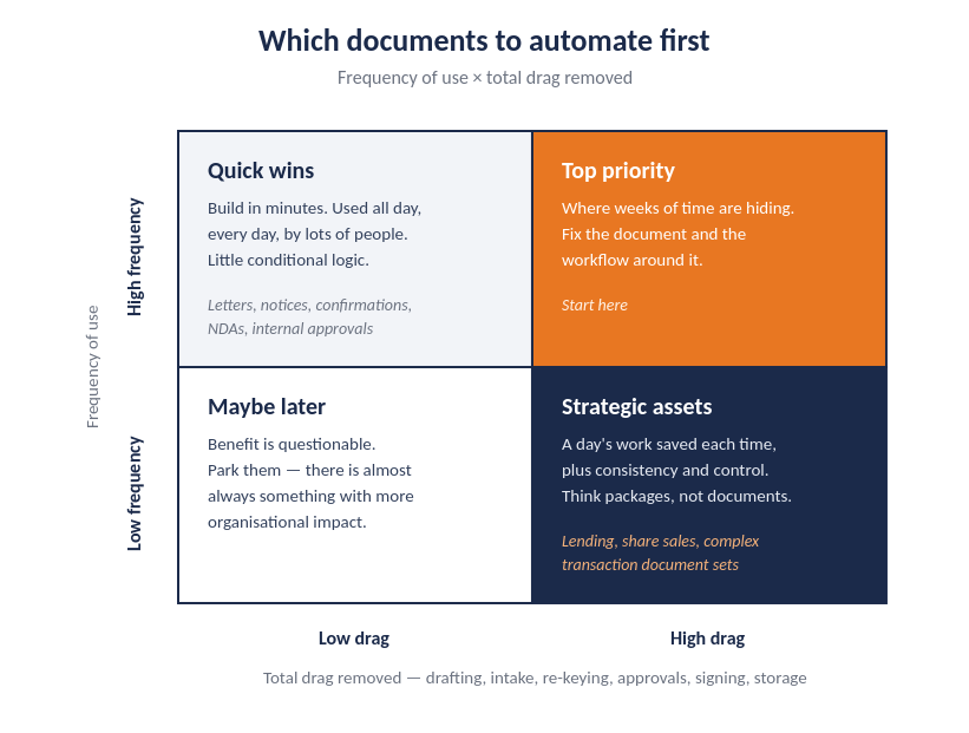
High frequency, high drag - your top priority. This is where weeks of time are hiding. Fix the document and the workflow around it and the impact can be substantial. These are the ones to go after first.
High frequency, low drag - your quick wins. Templates you can build in minutes. Not much conditional logic, obvious how they're meant to work, used all day, every day, by lots of people. A very good place to start accumulating wins that add up, and the subject of Start simple: why the most obvious document is usually the wrong place to begin.
Low frequency, high drag - your strategic assets. Lending transactions, share sale agreements, that kind of thing. When someone does one, you might save a full day's work - and you're not only speeding it up. You're making sure every clause is exactly the right approved one, and that a decision made once flows consistently through hundreds of places in the document.
These take more time and more thought. There are usually other documents clustered around them, so you're not automating one document, you're working out how the whole package fits together. There's normally more change involved too. But done well, this can be a genuinely differentiating capability - something your competitors can't easily match.
Low frequency, low drag - the maybe list. The benefit is questionable. Park them. You'll almost always find something with more organisational impact than automating every last document on the list.
Scoring your candidates
Once documents are in quadrants, three criteria will separate the ones to start on:
Value. How much time will you save? How much risk and error will you remove? And who else benefits - is this one team or the whole organisation?
Effort. A combination of template complexity, integration requirements, whether the data you need is available, and - importantly - how much existing automation you can reuse.
That last point matters more than people expect. A lot of what goes into a template is work we've done many times before in HotDocs: the way parties are captured, the way execution blocks are built and tagged. That can be a large share of a build, and it can often be lifted across, knowing it's already tried and tested. Effort shrinks as you develop consistent ways of doing things, and AI is making template creation easier again. It isn't the challenge it was a few years ago.
Readiness. You're not just changing a document; you're changing a process. Have you brought the people involved into it? Do they understand what's being asked of them? Have they had a chance to raise what matters to them so the result actually works in practice? A technically excellent template dropped onto an unready team doesn't get used.
Two traps
Don't prioritise by who shouts loudest. People will always want to jump the queue. Some of them will be right. But you need to know the project will deliver value and will work as needed - and applying the framework consistently is what lets you say no without it being personal.
Don't automate a broken process. Given everything above about intake, approvals, signing and storage, there's usually something around the document that needs fixing as part of the project. If you lay automation over the way things have always been done, you'll get a minor improvement at best - and you'll have spent the goodwill you needed for the real change.
Where to start
Pick your five to ten most likely candidates. Put each one in a quadrant, honestly. Score the top-right and top-left ones on value, effort and readiness.
The list you end up with will look different from the list you would have written from memory - and it will be defensible when someone asks why their document isn't first.
If you'd like to talk through how any of this applies to your documents and processes, I'm always happy to have a conversation.
This post is part of a series on getting more value from document automation.
