



In earlier posts, we’ve looked at setting up a more stable, scalable, and flexible SharePoint structure, implementing a tool to enable email and document management within SharePoint, and setting up a Microsoft Power App for Matter Management to bind the functionality into a more coherent, single view.
The next thing I would look at is having some form of digital intake.
Most legal teams I talk to continue to have an almost allergic reaction to this. They really like to retain the personal touch, where they work with their clients however their clients want to work with them, which can include receiving instruction from them in any way that suits the client. This can be informal conversations, meetings, or – very commonly - emails.
The problem with this is that it provides very little ability to automate later stages of the process.
If you want to run efficient workflows, you’re going to have to get some digital data into a structured format.
Most people are now very capable of filling in some basic forms, as long as the forms have been thoughtfully designed and ask only for information they are likely to have and can understand the point of.
There are some very good form solutions available. I would not recommend using Microsoft Forms as it is very basic and clunky. At LawHawk, we use Cognito Forms and can easily design, build, and support these forms for in-house legal teams.
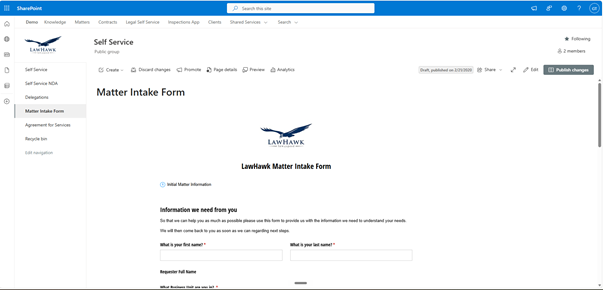
Cognito Forms can be embedded in SharePoint and website pages, which anyone, internal or external, can access as needed without feeling like it’s a different system. Upon submission, documents and data can be emailed to the right people or automatically saved to the right locations.
Even if only some in the business are willing to fill out the form, each one that does reduces the legal team's workload. What we see is that people in the business respond much more positively to it than the legal team expects.
Even if some people remain resistant, there is absolutely nothing to stop someone on the legal team from having the conversation with them and then filling in the form themselves.
Another advantage of a digital intake form is that it can trigger the automatic creation of the SharePoint matter site I discussed in my earlier post. When someone in the business submits a form requesting help, the legal team can receive an email. When they click the unique link in that email, another page can open, allowing the legal team to add further details about how they want to manage the matter. That could include whether they want to create a separate SharePoint site for that matter. If they choose that option, the site can be automatically created, and any uploaded files will be automatically saved. The matter would be displayed immediately in the Microsoft Power App for matter management.
If you’re interested in seeing what a Cognito Forms intake form might look like, check out this example intake form.
AI Triage?
I am aware that AI can also be used to triage emails and could structure the request into required fields. I’ve been testing Claude Co-Work, and initial results show it’s quite useful.
However, it can only work with the information it’s given in the email, and you may still not get the information you need on the first go. If you use a dynamic intake form designed for each work area, you can make it easier for the requester to provide all the details you need, in the format you need, without additional AI.
I’m not opposed to AI intake triage and will continue testing it, but it may be another example of where simple automation can deliver better, more cost-effective results.
If you would like to discuss your own intake processes and how they could be improved, please get in touch. The fun part in these areas is that you get to design your own process in a way that works best for your and your clients.
